
Key Attestation Demo
Xingchen & RikkaLibraries & Demo
4.813.00 Reviews
- Version
- 1.5.0
- Installs
- 100.00K
- Age Rating
- Everyone
Screenshots
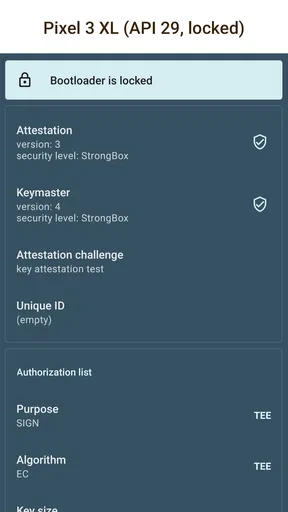
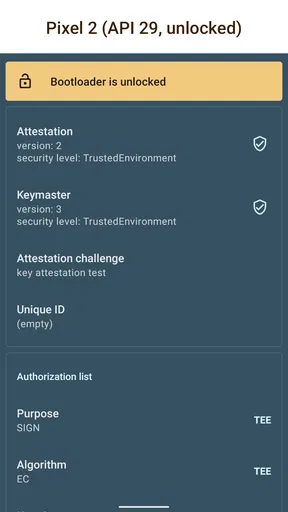
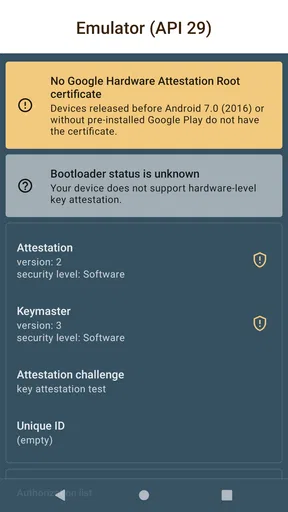
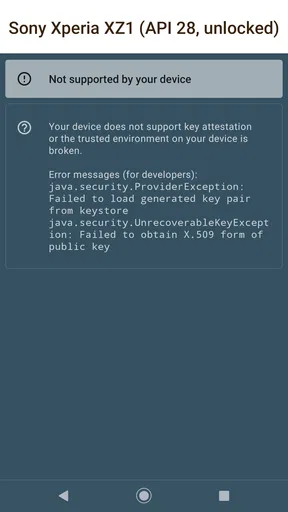
Our Review of Key Attestation Demo
 Analysis by Appyee
Key Attestation Demo is a small, technical Android app with a very specific purpose: it lets you explore the system’s Key Attestation feature rather than offering a conventional library, productivity tool, or entertainment experience. I found it most useful as a hands-on reference for understanding how Android can report information about cryptographic keys and the device environment behind them.
That narrow focus is important. This is not an app I would recommend to someone looking for a general security scanner or a simple explanation of phone safety. It is aimed at developers, Android enthusiasts, security learners, and anyone who needs to inspect the idea of hardware-backed key verification from a mobile device. The experience is closer to a compact technical demonstration than a polished consumer utility.
What the demo actually helps you examine
The app comes from Xingchen & Rikka and belongs to the Libraries & Demo section of Android apps. Its central subject is Android Key Attestation, a system feature associated with checking properties of cryptographic keys and the environment in which those keys are generated or held. That makes the app valuable because it turns an otherwise abstract platform capability into something you can investigate directly.
In practical terms, I see it as a bridge between Android documentation and real device behavior. Reading about attestation can leave you with a vague understanding of certificates, key origins, and trusted hardware. A demonstration app gives those concepts a place to start: you can run the tool, inspect what it presents, and connect the terminology with the handset in your hand.
The app is free, carries an Everyone age rating, and its current version is 1.5.0. It supports Android 7.0 and later, which gives it a reasonably broad audience among compatible devices. Its average rating is 4.8 from around 338 ratings, and it has passed over 100K installs. Those figures suggest that it has found a clear audience without pretending to be a mass-market application.
I would not judge it by the standards I use for a polished everyday app. The important question is whether it makes the attestation workflow understandable and inspectable. For that purpose, its restrained design is more appropriate than a screen full of unrelated security tools.
A useful first step for Android security learners
My favorite use case is learning by comparison. If you have access to more than one Android phone, running the same demonstration on each device can help you think about why system-level security results may differ. The exercise is not about declaring one handset “safe” and another “unsafe.” It is about noticing that Android security capabilities depend on the operating system, hardware, provisioning, and device configuration rather than on an app’s appearance alone.
That distinction is easy to miss when using ordinary security apps. Many alternatives focus on malware detection, privacy indicators, or a checklist of visible settings. Those tools can be more approachable for nontechnical users, but they answer different questions. Key Attestation Demo is closer to a platform inspection aid: it helps you examine a particular Android security mechanism instead of surveying the whole phone.
For a developer, the value is even clearer. You can use the app as a quick companion while studying how an attestation response is structured and what kinds of information a relying service might evaluate. It does not replace implementing and testing your own application logic, but it can make the underlying concept less theoretical.
Where connectivity enters the experience
The app’s subject naturally raises questions about network use. Key attestation is not just a visual phone diagnostic; it relates to cryptographic evidence that may be interpreted by another system. That means the most important connectivity question is not whether the interface looks connected, but whether you are trying to validate or use the result in a broader workflow.
When I approach a tool like this, I separate local inspection from remote verification. Looking at what the demo presents on the device is one task. Sending an attestation result to a service, checking a server-side policy, or comparing the response with documentation is another. Those activities can involve network access outside the simple act of opening the app, and they should be treated as separate stages rather than assumed to be one seamless process.
This separation is helpful on a train, in a basement office, or anywhere the connection is unreliable. I can prepare my questions and examine the information available in the demonstration, then perform any broader validation later when a dependable connection is available. I would not treat the app as a replacement for a backend attestation test, particularly when the goal is to protect a real service.
The key trade-off is that the app can clarify a local technical concept, but it cannot turn a phone screen into a complete trust decision. A result only becomes meaningful when you understand what it represents, how it was obtained, and what a receiving system would do with it.
Using it in ordinary mobile situations
Although the subject is technical, the app is well suited to short mobile study sessions. I can imagine opening it while testing a spare phone, checking a newly reset device, or reviewing Android security concepts away from a desktop. It is less demanding than setting up a full development project just to get a first look at the feature.
A realistic scenario would be a developer carrying two test phones to a meeting. Before discussing an app’s device-integrity strategy, the developer uses the demo on each handset to understand what the devices expose through the platform’s attestation path. The notes from that exercise do not become a final security policy by themselves, but they provide useful context for the conversation.
Another scenario is a student working through Android security material. Instead of memorizing terms such as key origin or attestation certificate, the student can use the demonstration as a prompt for investigation. What is visible? Which parts are device-dependent? Which conclusions require a server? That kind of questioning is more valuable than simply treating a displayed result as a pass-or-fail grade.
The mobile format also creates a limitation. A phone is convenient for inspection, but it is not the best place to analyze complex certificate chains or document a detailed investigation. For serious work, I would pair the app with Android documentation, a development environment, and a written test plan. The demo is a useful field instrument, not a complete lab.
What to do when the result is confusing
Technical demonstrations can be frustrating when the output does not match expectations. A device may expose different capabilities from another model, an operating-system update may change behavior, or a test may fail for reasons that are not obvious from the first screen. My advice is to avoid treating an unexpected result as proof that the phone is compromised or that the app is broken.
Start with the simplest recovery path: close the app, reopen it, and repeat the observation carefully. Then check whether you are comparing like with like. The Android release, device model, security configuration, and test conditions all matter when you compare attestation behavior. If the result remains unexpected, record the exact context instead of relying on memory.
This is where the app’s narrow scope becomes both a strength and a weakness. Because it concentrates on one system feature, it encourages focused troubleshooting. At the same time, it does not provide the broad diagnostic explanations that a consumer security suite might offer. If you need a plain-language reason for a device warning, a general support tool or official device documentation may be a better next step.
I also recommend keeping recovery work separate from security conclusions. Repeating a test can tell you whether a temporary problem has disappeared, but it does not prove that a device meets the requirements of an application. For a production service, the authoritative decision should remain in the service’s own validation process, not in a manual reading of a demonstration screen.
Being careful with data and network use
Anyone exploring attestation should think about the information involved before sharing screenshots or copying results into public channels. Cryptographic and device-related details may be harmless in one context and sensitive in another, especially when they are combined with a device identity, account information, or internal testing notes.
I would use the app in a controlled way: inspect the output, write down only what is needed for the experiment, and remove identifying details before sharing examples with classmates or colleagues. This is not because the app should automatically be treated as suspicious; it is simply good practice when examining security-related material.
Connectivity also deserves a practical rule. If you are on mobile data, do not assume that every part of a broader attestation workflow has the same cost or purpose. Keep local inspection and remote submission conceptually separate, and only send information to a service you trust and understand. When testing your own application, make sure the server’s policy is documented so that a network failure is not confused with a failed attestation.
For privacy-conscious users, the app is a better fit when used as a learning and inspection aid rather than as an always-running monitor. Its usefulness comes from deliberate checks. Opening it for a specific question is more sensible than expecting it to watch the device continuously like a general security product.
How it compares with more familiar alternatives
The usual alternatives depend on what you are trying to learn. A device-information app may show model, Android version, and hardware details in a friendlier format. A security scanner may look for unwanted software. A developer sample may show how to call an API inside an application. Key Attestation Demo sits in a different space: it focuses attention on the attestation feature itself.
That focus makes it more useful than a generic device-information viewer when your question is about cryptographic key evidence. However, it is less suitable if you want an all-in-one report about battery health, privacy, malware, or system performance. Choosing it means accepting that the app will not try to solve every Android security question.
It also differs from building a personal test project. A custom project gives you control over the request, the response handling, and the server-side workflow. The demonstration is faster for initial exploration and comparison, but it is not a substitute for engineering those pieces yourself. I would use the demo to understand the terrain, then move to a controlled development setup when designing a real feature.
That division of labor is one of the app’s most useful lessons. It shows why a visible result on a phone is only one part of a trust model. A production system needs clear policies, secure communication, careful parsing, and decisions made on the server where appropriate.
Who should install it, and who should skip it
I recommend it to Android developers, security students, mobile testers, and technically curious users who want a direct introduction to Key Attestation. It is especially worthwhile if you are comparing devices or trying to understand why hardware-backed security matters to an application.
I would skip it if you want a simple “is my phone secure?” answer. The app is too specialized for that expectation. Someone looking for parental controls, malware protection, privacy auditing, or a general hardware summary should choose a tool designed for that job instead.
It is also not the right choice as the only test for a commercial app’s integrity strategy. A demonstration can support investigation, but it cannot replace a complete implementation and a backend policy. If your work involves real user accounts or sensitive transactions, use the demo as a learning aid rather than as the final authority.
My connectivity verdict
After spending time with the app, I see its strongest quality in its discipline. It does not bury Key Attestation under unrelated features. That makes it a practical starting point for understanding a specialized Android security capability, especially when you want to compare devices or prepare for deeper development work.
The connectivity angle reinforces that lesson. The app can be useful during mobile, intermittent, or low-attention situations because the first stage is personal inspection and study. But any workflow that depends on remote interpretation, service validation, or a production security decision needs a reliable connection and additional tooling. I would plan for those stages instead of assuming the demonstration handles them for me.
Released on April 1, 2020, and maintained in the compact form represented by version 1.5.0, it remains a focused choice rather than a broad Android utility. The free price removes the main barrier to trying it, while the Everyone rating makes it accessible to curious learners. Its value depends almost entirely on your interest in the subject.
My recommendation is straightforward: install it if you want to see Android Key Attestation in a concrete, device-level context and are willing to read the results thoughtfully. It is a focused learning and testing companion, not a universal security verdict. Used with that expectation, it can make a difficult platform feature much easier to investigate without pretending that one mobile demonstration can answer every question about trust, privacy, or connectivity.
Verdict
Strengths of Key Attestation Demo
- Open-source code makes the demo easier to inspect and understand.
- Useful for learning how Android key attestation responses are structured.
- Helps developers test hardware-backed keystore support on compatible devices.
- Small and focused app with no unnecessary features or complex setup.
- Can reveal whether a device offers stronger cryptographic key protection.
Limitations of Key Attestation Demo
- Requires a compatible Android device and may show limited results on older hardware.
- Attestation output can be difficult to interpret without security knowledge.
- Results may vary between manufacturers and Android versions.
- It is a technical demonstration, not a complete security auditing tool.
- Some features may depend on Google services or device-specific implementation.
Similar Picks in This Category
View All
PGT: GFX, Launcher & Optimizer
Trilokia Inc.4.5

AusweisApp Bund
Governikus Service GmbH3.7

Cardboard
Google LLC3.2

Gamers GLTool with Game Tuner
Trilokia Inc.4.5

Multi Web Chat - Read Secretly
World Scan & Cleaner3.8

App Cloner Premium & Add-ons
App Listo1.9
Frequently Asked Questions
What is Key Attestation Demo and what is it used for?
Key Attestation Demo is a utility application designed to demonstrate how Android key attestation works. It allows users and developers to inspect information related to cryptographic keys generated and protected by the Android Keystore system. The app is primarily educational and useful for testing device security capabilities, rather than for everyday tasks such as password management, file encryption, or antivirus protection.
Does Key Attestation Demo require root access or special permissions?
In normal use, Key Attestation Demo is intended to work without root access because it relies on Android’s standard Keystore and key attestation APIs. However, the amount of information available depends on the device, Android version, manufacturer implementation, and security hardware. You may need to grant basic permissions requested by the app, but it should not require unrestricted system access to display its demonstration results.
What information can Key Attestation Demo show about my device?
The application may display technical attestation data connected with a generated cryptographic key, including key properties, certificate details, security levels, and indicators related to hardware-backed protection. Depending on the device and Android version, results can also reference verified boot or system integrity states. The information is intended for technical analysis, so some fields may be difficult to understand without familiarity with Android security.
Will Key Attestation Demo prove that my device is completely secure?
No. Key Attestation Demo can help illustrate whether certain cryptographic operations are supported by software or secure hardware, but it is not a complete security audit. A successful attestation does not guarantee that every part of the phone, operating system, installed application, or network connection is safe. Treat the results as technical evidence about specific Keystore capabilities, not as a universal security certificate.
Is Key Attestation Demo useful for regular Android users or mainly developers?
The app is mainly aimed at developers, security researchers, testers, and technically curious users who want to understand Android key attestation. Regular users may find it interesting when checking device security features, but the terminology and certificate output can be confusing. Before downloading, keep in mind that it does not provide conventional security tools, performance improvements, or visible benefits for everyday phone usage.
